Skan - AI Skincare and Beauty
- 4.6
- Rating
- 100.00K
- Installs
- Free
- Price

 Analysis by App-foxy
I approached Skan as a beauty app for people who want more structure in their skincare routine, not as a replacement for a dermatologist or an instant filter that promises perfect skin. Its central idea is simple: use AI-powered facial scanning to turn a quick look at your face into skincare insights that you can follow over time. That makes it more interesting than a basic product catalog, because the focus is on observing changes rather than choosing a cream at random.
The app comes from Skan Beauty Inc and sits in the beauty category. It is free to install, rated for Everyone, and works on devices running Android 8.0 or later. The current release is version 1.0.0, so I would approach it as a young product with room to mature. It has an average rating of 4.4 from around 1.7 thousand ratings and has passed 10 thousand installs, which suggests that the concept is already attracting a useful early audience without making it feel like an overcrowded social platform.
What using the facial scan feels like in a real routine
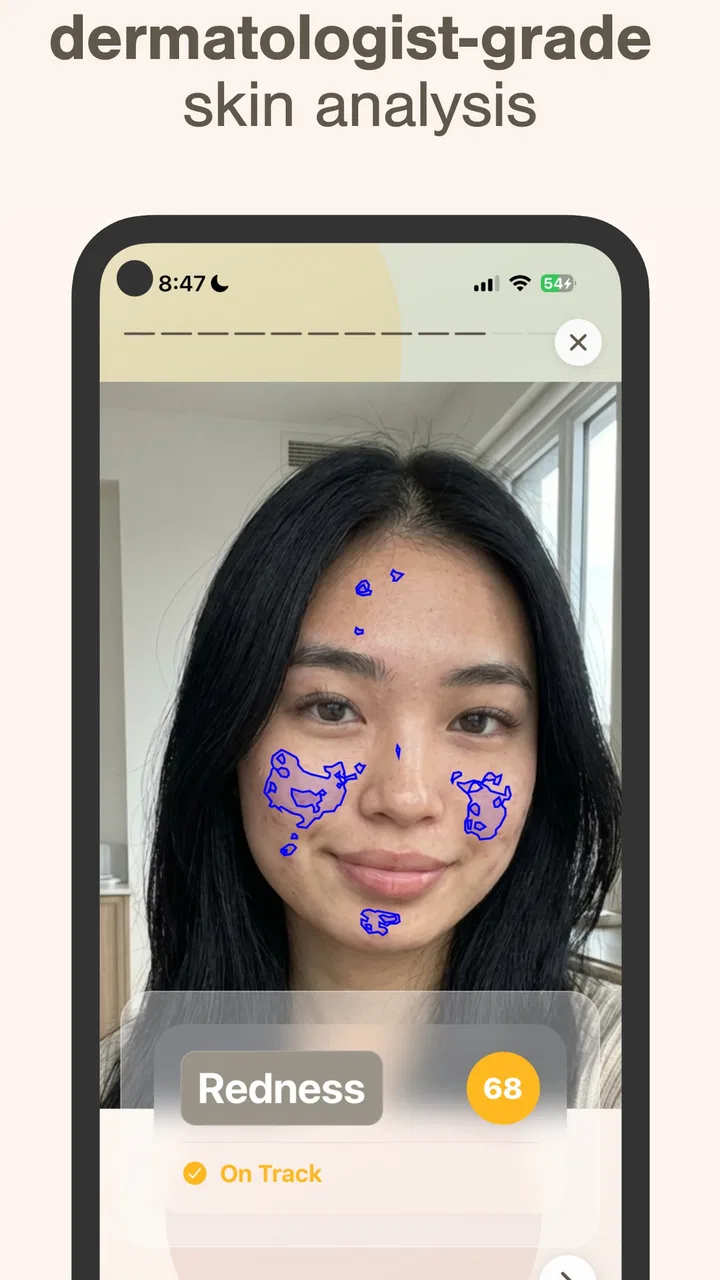
The most useful way to think about the scan is as a checkpoint. I would not open it every time I looked in the mirror. Instead, I would choose a repeatable moment, such as after washing my face in the morning, and try to keep the lighting, camera angle, and distance reasonably similar. That small habit matters because an AI assessment can be influenced by conditions around the face, not only by the skin itself.
You May Also Like

 Blood Strike: 2.5 Anniversary
Blood Strike’s Loadouts Turn Every Drop Into a Tactical Gamble
A close look at Blood Strike’s custom loadouts: how fast access to signature weapons reshapes its battle royale rhythm, rewards preparation, and narrows the gap between fights.

 Pandora - Music & Podcasts
Pandora’s Music Is Easy to Start, but Harder to Recover
Pandora’s strength is its low-effort path from a seed to a station. Its weak spot is how much confidence it asks you to place in connection, setup, and quiet recovery.

 8 Ball Pool
 Is Built on Rivalries, Rematches, and Routine
A close look at the rivalries, rematches, shared routines, and unanswered safety questions that turn a quick pool match into a persistent mobile community.

 Samsung Music
’s Quiet Strength Is Playing What You Already Own
Its reach comes less from spectacle than from dependable access to a personal library. That simplicity is both the app’s strongest retention engine and its ceiling.

 AccuWeather: Weather Radar
AccuWeather Review: A Quick, Clear Forecast for Everyday Decisions
For everyday plans, the best forecast is the one you can understand quickly. AccuWeather makes rain timing, radar, and local conditions easy to act on, with a few trade-offs.

 Hill Climb Racing
Why Hill Climb Racing Still Turns Crashes Into One More Run
A tiny car, a bumpy hill and one more upgrade: Hill Climb Racing keeps resurfacing because its simple chaos makes every near-miss feel personal.
More From Our News Desk



A practical routine could look like this: on a quiet Sunday, I would take a scan before applying products, read the resulting insights, and note anything I wanted to watch during the week. After several days, I would repeat the process under similar conditions. This turns the app into a personal observation tool. The value is not necessarily in treating one scan as a definitive verdict; it is in creating a more consistent way to notice whether my routine seems to be moving in a helpful direction.
That approach also keeps expectations realistic. Facial scanning can organize what I see, but it should not be treated as a medical diagnosis. If a spot is painful, changing quickly, persistent, or worrying, I would stop relying on an app and ask a qualified professional. Skan works best for everyday skincare awareness, especially when the user understands that an automated insight is guidance rather than clinical advice.
I also like the possibility of using the app before changing several products at once. If I replace cleanser, moisturizer, exfoliant, and sunscreen together, I have no sensible way to tell what helped or caused irritation. A scan-based routine encourages me to establish a starting point, change one major thing at a time, and check in again later. That is a more thoughtful workflow than reacting to a single bad skin day.
Speed expectations during a normal scan
For a beauty app built around facial analysis, the important performance question is not whether every screen feels flashy. It is whether the scan fits naturally into a short routine. I found the concept most appealing when treated as a quick check rather than a long consultation. The experience makes sense for a person standing near a window, taking a moment to capture a face, and then reading the app’s interpretation before getting on with the day.
Lighting is one of the first things I would control. Strong shadows, a bright window behind me, or a dark bathroom can make any camera-based assessment harder to trust. I would also remove heavy makeup before scanning if my goal were to understand my skin rather than evaluate a finished look. This is a small but important distinction: the quality of the insight depends partly on the quality and consistency of the input.
The app’s free entry point makes experimentation easy. I can try the scan without committing money at the start, which is useful for deciding whether the process feels comfortable and worthwhile. Some optional purchases range from $1.99 to $49.99 per item, so I would examine what each purchase adds before paying. The free installation is not the same as assuming every part of the experience will remain free.
My advice is to avoid judging the app from one rushed scan. If the first result feels surprising, I would repeat it later under calmer conditions rather than immediately buying a product or changing my entire routine. That is both a better skincare decision and a fairer test of the app’s usefulness.
Where heavier use can become demanding
The heaviest moment is likely to be the facial scan itself, because camera-based analysis is more involved than reading a static article or browsing a list of products. I would expect the experience to feel more demanding when the phone is older, storage is tight, the battery is low, or several other apps are active. I would not run repeated scans back to back just to chase a different result; that creates extra device work without necessarily producing better information.
A sensible workflow is to scan once, review the insights carefully, and record the practical takeaway. If I am testing a new moisturizer, I might use the app at the beginning and then return after a consistent period rather than opening it many times in one afternoon. This reduces unnecessary camera use and makes the comparison more meaningful.
Heavy use can also mean demanding too much from the app conceptually. A person who wants a complete shopping assistant, a detailed ingredient encyclopedia, and a medical-grade assessment may find that an AI skincare scanner is not enough on its own. I would pair its observations with product labels, advice from a professional when needed, and my own record of irritation or comfort. The app is strongest as one part of a routine, not as the only source of judgment.
For users who take many photos, the practical trade-off is attention rather than just device resources. Repeatedly checking perceived imperfections can make skincare feel stressful. I would set a schedule and stick to it. That keeps the app focused on gradual improvement instead of turning every mirror check into a new evaluation.
Stability and what I would do when a scan goes wrong
Because this is version 1.0.0, I would give it a little patience during early use. A new app can feel promising while still needing refinement around camera capture, navigation, or how clearly it explains an insight. My reliability test would be straightforward: can I complete a scan, understand the result, and return to the routine without confusion? If that works consistently, the app has a useful foundation even if some edges still feel young.
If a scan fails or the result looks clearly inconsistent, I would first improve the conditions instead of assuming my skin changed dramatically. I would clean the camera lens, move to even light, hold the phone steadily, and try again later. I would also avoid comparing a scan taken under makeup with one taken on bare skin. These recovery steps are more valuable than repeatedly tapping the same button.
When an app is used for personal beauty tracking, clarity is part of reliability. An insight should help me decide what to observe next, not leave me anxious about a vague label. If the wording feels too broad, I would treat it as a prompt for further observation rather than a command to purchase something. That is especially important when optional items can cost as much as $49.99 each.
I would also keep a simple note outside the app: the date of the scan, the products used recently, and anything unusual such as poor sleep or a new cosmetic. This gives context that an automated facial snapshot may not know. It is one of the more useful advanced habits for getting value from Skan, because it prevents me from blaming a single product or trusting a single image too quickly.
Device limits and who should be careful
The minimum operating system is Android 8.0, which opens the door to a wide range of phones, but compatibility alone does not guarantee an equally smooth experience on every device. Camera quality, screen size, available storage, and general age can all affect how comfortable a scan feels. On a small or older phone, I would expect to spend more time positioning my face and reviewing results.
A newer phone may make the process easier simply because its camera and general responsiveness are better, but I would not buy a new device for this app. If the phone already handles ordinary camera apps comfortably, it is reasonable to try Skan and see whether the workflow suits me. I would close demanding apps first if the scan feels slow, and I would avoid using it while the phone is overheating or nearly out of battery.
Privacy is another point I would consider before making facial scanning part of my routine. A face is sensitive personal information, so I would read the app’s current permissions and privacy explanations carefully before scanning. I would want to understand what the app requests, how it describes image handling, and whether I am comfortable with that arrangement. This is not a reason to dismiss the app automatically, but it is a reason to make an informed choice rather than tapping through setup without reading.
The Everyone age rating makes the app broadly accessible, but younger users still benefit from adult guidance when skincare advice leads to purchases or major routine changes. A simple scan should not encourage harsh treatments, excessive exfoliation, or unrealistic expectations. The most responsible use is gentle, gradual, and focused on comfort and consistency.
How it compares with ordinary skincare alternatives
The usual alternative is a notes app, a mirror, and personal memory. That combination costs nothing extra and gives me complete control, but it is easy to forget what my skin looked like last week or why I changed a product. Skan adds structure through facial scans and automated insights, which can make tracking feel more concrete for someone who struggles to keep a routine.
Another alternative is a beauty retailer’s product browser. Retail apps are often better when I already know what ingredient or product type I want to buy. Skan is more appealing earlier in the process, when I am trying to understand what to pay attention to. I would use the scanner to organize observations, then use independent research or professional advice before spending money.
Compared with a dermatologist, the app is quicker, more convenient, and easier to use for casual tracking, but it cannot replace professional examination. Someone with a recurring rash, severe acne, suspected allergy, or a changing mole should choose medical care instead. The decision is not really between Skan and a clinician; they serve different purposes.
It also differs from a beauty filter. A filter changes how a face appears on screen, while a skincare scanner is intended to provide observations that can influence a routine. That makes Skan more useful for progress tracking, but also more demanding in terms of honesty. I would use a consistent, unedited face because the goal is to learn from the condition of my skin, not to produce a flattering image.
Who gets the most from the app
I think Skan is a good fit for a beginner who feels overwhelmed by skincare choices and wants a repeatable starting point. It can also suit someone who has already bought several products but never tracks results carefully. In that case, the scan gives the routine a checkpoint and may discourage random switching.
It is particularly useful for a person preparing for an event who wants to monitor how a routine is settling before making last-minute changes. I would still avoid introducing aggressive products right before an important occasion, but a calm sequence of scans can show whether my usual routine appears stable.
People who enjoy quantified self-care may appreciate the sense of continuity. The strongest benefit is not one dramatic recommendation; it is the discipline of checking under similar conditions and connecting observations with actual habits. That is a less obvious strength than the AI label, and it is where I see the app becoming genuinely practical.
I would skip it if I dislike taking facial scans, do not want to think about skincare regularly, or expect a guaranteed diagnosis. I would also choose another option if my main goal is simply to buy a specific product at the lowest price. Skan is not the fastest route for every beauty task, and its value depends on being willing to reflect on the results rather than treating them as orders.
My performance and everyday-use verdict
In performance terms, I would judge this app by whether its scan is easy enough to repeat, its insights are clear enough to act on, and its routine remains comfortable on my phone. It is not an app I would need open constantly. Used in short, controlled sessions, it has a sensible role: helping me create a baseline, notice gradual changes, and avoid making skincare decisions entirely from memory.
The main friction comes from the need for consistent capture conditions and sensible interpretation. A rushed image, poor light, makeup, or an overreaction to one result can weaken the whole process. The optional purchase range also means I would explore the free experience first and only pay when I understand what I am receiving. That makes the app approachable, but not automatically risk-free for someone who is quick to buy beauty products.
Overall, I would recommend Skan to a friend who wants a more organized skincare habit and is comfortable treating AI insights as supportive guidance. I would describe it as a useful early-stage beauty app from Skan Beauty Inc, especially for tracking and reflection, rather than a definitive authority. Its broad age rating, free starting point, and modest early audience make it easy to try, while the young version means I would keep expectations measured.
My bottom line is simple: use it slowly, scan under similar conditions, keep notes about your routine, and let professional advice take over when a skin concern is serious or persistent. With that mindset, the app can make everyday skincare more deliberate without pretending that a phone camera knows everything about your skin.
FAQs for Skan - AI Skincare and Beauty
01What is Skan - AI Skincare and Beauty, and how does it work?
Skan - AI Skincare and Beauty is an innovative app designed to help users improve their skincare routine by using artificial intelligence. The app analyzes your skin through photos and provides personalized skincare recommendations and tips. It utilizes advanced AI algorithms to evaluate factors like skin tone, texture, and blemishes, offering a customized skincare plan tailored to your specific needs.
02Is Skan - AI Skincare and Beauty free to use?
Skan offers a free version with basic features, but to unlock the full potential of the app, including advanced analyses and personalized skincare plans, users may need to subscribe to a premium version. Pricing details can vary, so it's best to check the app store for the most current subscription options and pricing.
03How accurate are the skin analyses provided by Skan?
The accuracy of Skan’s skin analysis depends on the quality of the photos uploaded and the lighting conditions. While the AI technology is advanced, it’s important to note that it might not replace professional dermatological advice. Users should consider the app’s recommendations as supplementary guidance and consult a dermatologist for specific skin concerns.
04What devices are compatible with Skan - AI Skincare and Beauty?
Skan is available for both Android and iOS platforms, making it accessible to a wide range of smartphone users. Ensure your device meets the app's minimum operating system requirements for optimal performance. Regular updates may also be required to access new features or improvements in the app.
05What privacy measures does Skan take to protect user data?
Skan prioritizes user privacy by implementing strict data protection protocols. The app typically requires permission to access your camera and photo library for skin analysis purposes. It’s important to review the app’s privacy policy to understand how your data is collected, used, and stored. Users can usually manage their privacy settings within the app.
Pros
- Accurately analyzes various skin concerns.
- User-friendly interface with quick navigation.
- Offers personalized skincare recommendations.
- Integrates with popular skincare brands.
- Includes a community for sharing tips.
Cons
- Requires a stable internet connection.
- Limited free features; premium is costly.
- Occasional bugs in skin scan accuracy.
- Some features locked by regional restrictions.
- High battery consumption during use.

Skan - AI Skincare and Beauty
Gallery